
Gemgala Host Earnings & Withdrawal Guide
Learn how Gemgala Host earnings work and how to withdraw Gems with ease.
Gemgala Earning Sources
Gift rewards from users all over the world
Daily tasks for hundred thousands of Coins
Minigames & events
Host Withdrawal Requirements
Have Linked a MetWallet account
Please register a MetWallet account if do not have one
Meet minimum withdrawal amount
You need at least 100.000 Gems before you can withdraw
Gemgala Host Linking MetWallet Tutorial
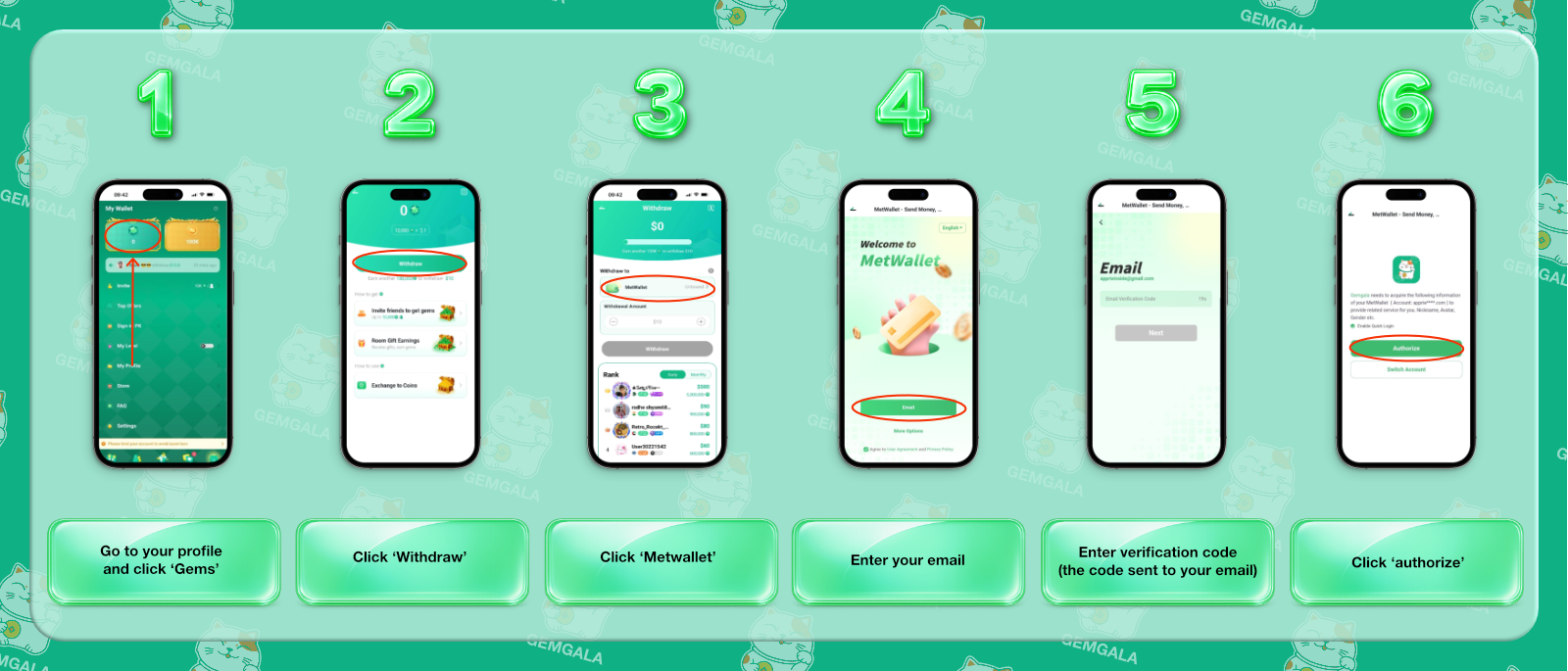
Open “Gems” menu
Go to your profile and select the ‘Gems’ menu.
Select Withdraw
In the Gems section, choose Withdraw.
Choose MetWallet
Select MetWallet from the available withdrawal options
Enter Your Email
Enter your MetWallet email address.
Enter the Verification Code
Gemgala will ask you to enter the verification code sent to your email.
Authorize the Connection
Select “Authorize” to complete the process.
Frequently Asked Questions
Which platform is used for withdrawal?
Gemgala only uses MetWallet for withdrawal purposes.
Where is the withdrawal menu?
Open Profile, select Gems, then Withdraw.
What if my withdrawal fails?
Please contact the Gemgala support team if your withdrawal fails.
Where can I see the available withdrawal bank or apps?
To see the available withdrawal method you must open your MetWallet account.
How long is the withdrawal process?
The withdrawal may take up to 2 to 7 days, this depends on the withdrawal method you chose.